On-Chain Activity
Usage across the project’s attributed contracts.
Find NEAR projects with repeat activity, trace a ranking back to its contracts, and give your agent the same data.
Follow a NEAR project from the leaderboard to its on-chain evidence, then see how Codex uses Invisible’s MCP server to answer a research question.
Watch on YouTubeOpen the workspace, choose Meteor or another supported NEAR wallet, and sign a message to create your profile. The profile menu shows the NEAR account you used and lets you sign out.
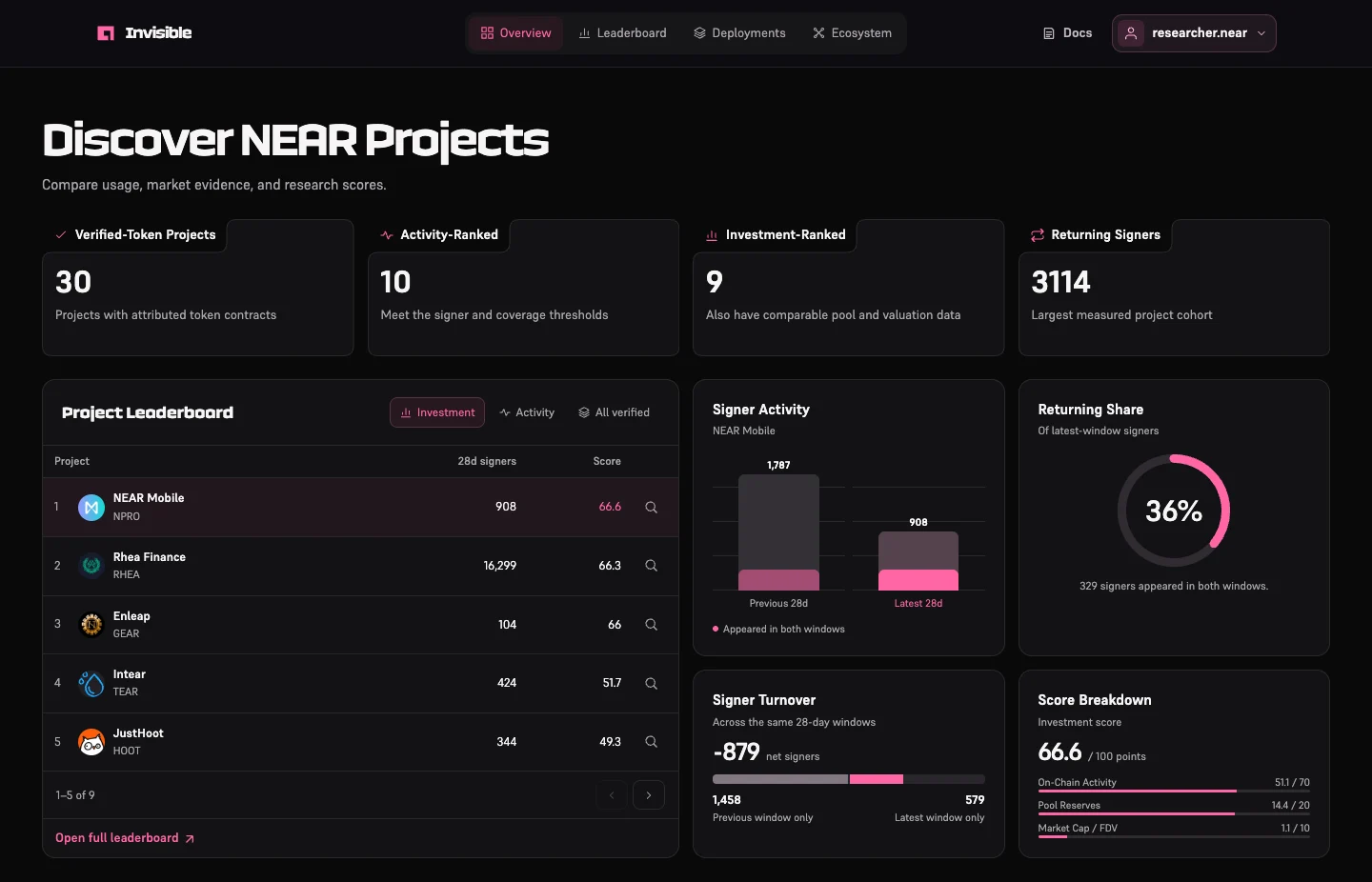
Use Investment for an activity and market comparison, Activity for usage across mapped contracts, or All Verified to see which projects lack enough evidence to qualify. Select a row to update the charts. The magnifier opens its evidence.
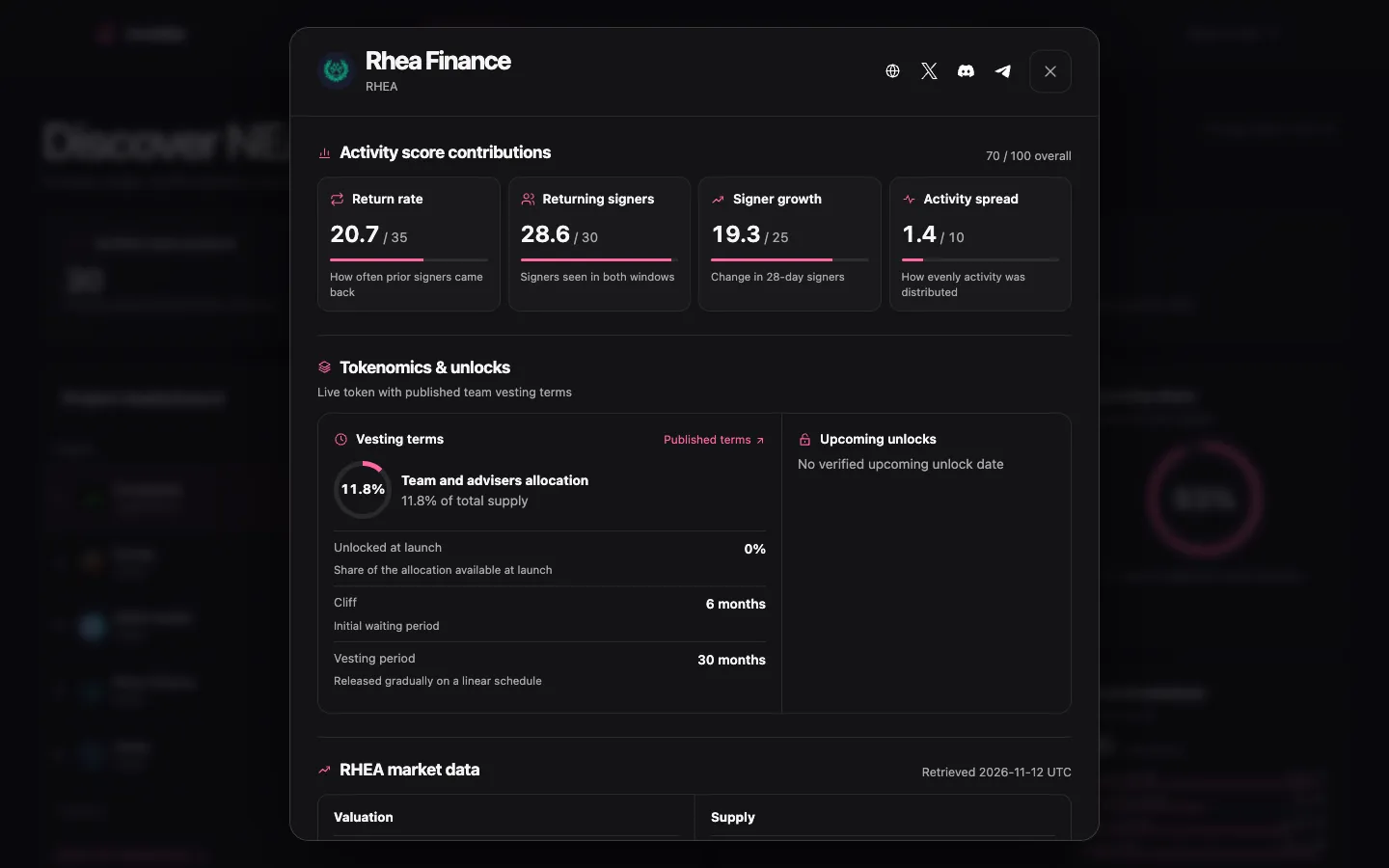
Open a project's evidence from the dashboard or leaderboard. Score contributions show how the project performed against peers. Tokenomics lists published allocation and vesting terms. Market figures include their own retrieval date and source.
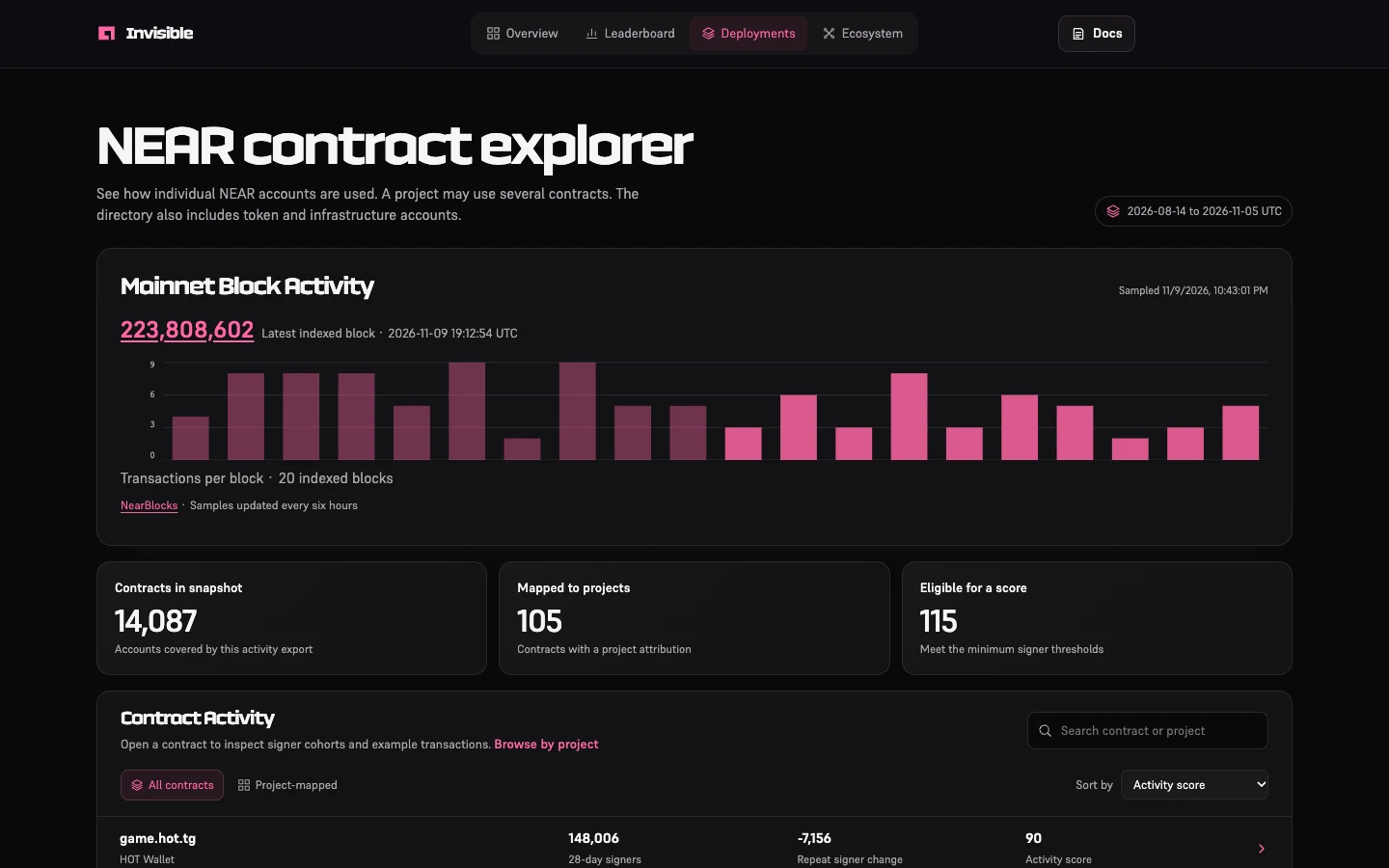
In Deployments, search by contract address or project. Project pages explain whether an account is a product contract, token, or shared service. Contract pages link to example transactions and show measured cohorts when available. The mainnet block sample refresh is scheduled every twelve hours. Check the saved block time for freshness. Contract transactions are sampled in rotation to stay within the provider limit.
Ecosystem compares changes in tracked contract volume and signer participation. The network gas series covers indexed mainnet activity when a complete series is available.
In Leaderboard, choose Forecast and select a project. The flat baseline carries forward the latest signer count. The cohort scenario applies the measured return rate to the latest cohort and carries forward the count seen only in that latest window. A third complete window lets us compare both estimates against what actually happened.
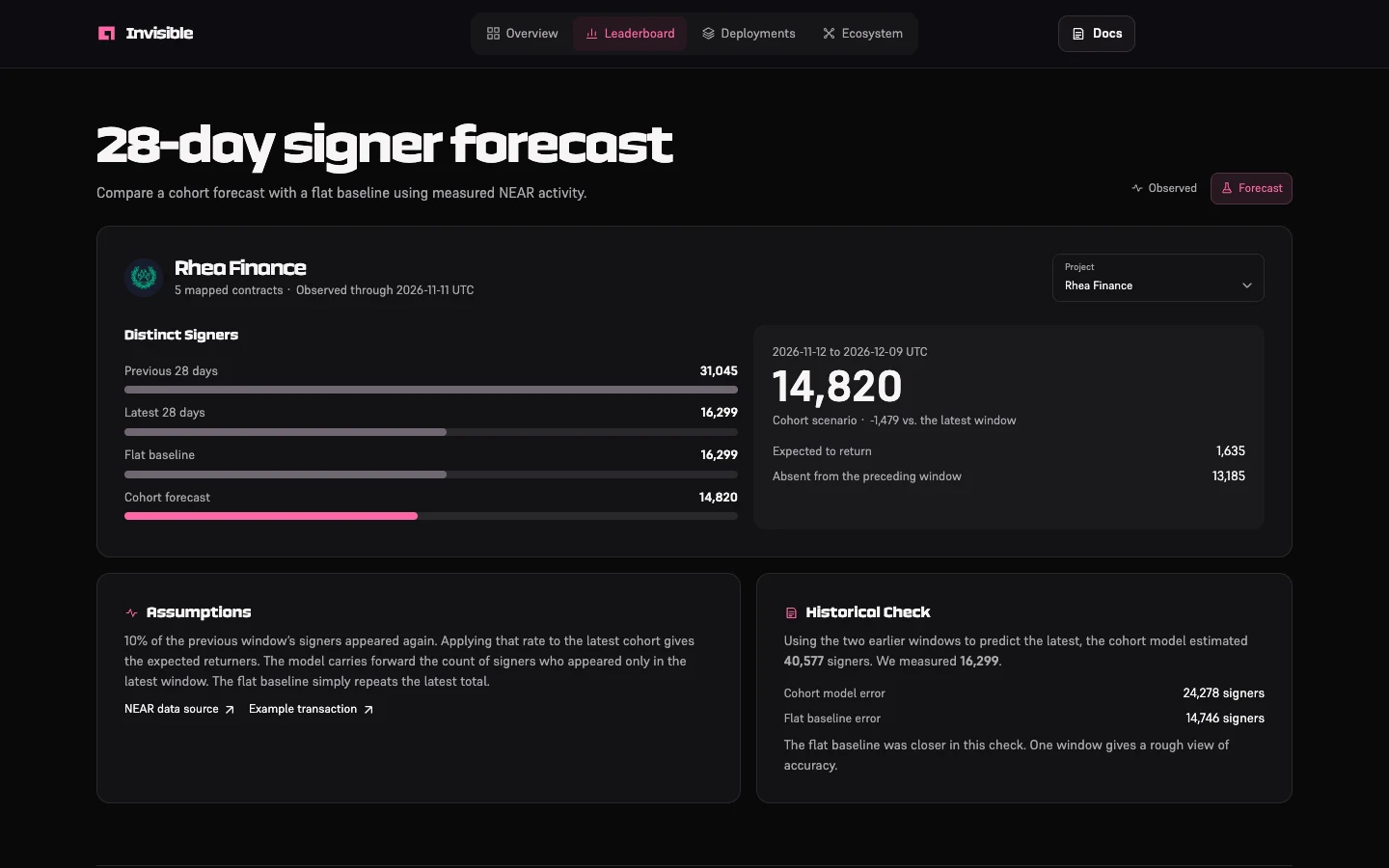
We count distinct signing accounts that directly attempted a function call to a mapped NEAR contract. We compare two complete, adjacent 28-day UTC windows. A returning signer appears in both. Calls routed through shared contracts or downstream receipts can fall outside a project's measured activity.
Projects need a verified token, at least 50 signers in each window, 10 in the prior weekly window, 10 returning signers, and activity on at least 14 days in the latest window. A signer is a NEAR account. Shared relayers, automation, and multiple accounts can affect the counts.
Activity scores combine relative percentiles across eligible peers. The investment ranking adds market inputs and requires comparable pool and valuation data.
Usage across the project’s attributed contracts.
Largest indexed NEAR pool, compared with ranked peers.
Reported market cap as a share of fully diluted valuation.
Download the archived pilot report. The archive uses the pilot methodology and its own dated snapshot.
Send a GET request to the same public data used in the workspace. Read the cutoff and status fields before comparing projects.
curl -fsS 'https://invisible-gray.vercel.app/api/v1/returning-signers?limit=10'curl -fsS 'https://invisible-gray.vercel.app/api/v1/projects/rhea'const response = await fetch("https://invisible-gray.vercel.app/api/v1/returning-signers?limit=10");
if (!response.ok) throw new Error(response.statusText);
const ranking = await response.json();const evidence = await fetch("https://invisible-gray.vercel.app/api/v1/projects/rhea");
if (!evidence.ok) throw new Error(evidence.statusText);
console.log(await evidence.json());Endpoints return JSON and support public, read-only access. Use the catalog to resolve a stable project ID before requesting its evidence. Use the market endpoint to check source and observation time separately from the activity cutoff.
/api/v1/projects?q=rhea/api/v1/projects/rhea/api/v1/projects/rhea/market/api/v1/projects/rhea/api/v1/projects/rhea/market/api/v1/rankings/api/v1/investment/api/v1/returning-signers?limit=10/api/v1/forecastConnect a client using Streamable HTTP. Invisible exposes search_projects, get_project_evidence, and get_rankings.
claude mcp add --transport http invisible https://invisible-gray.vercel.app/api/mcpWhich NEAR projects brought the most signers back? Show me the evidence.{
"mcpServers": {
"invisible": {
"url": "https://invisible-gray.vercel.app/api/mcp"
}
}
}Which NEAR projects brought the most signers back? Show me the evidence.codex mcp add invisible --url https://invisible-gray.vercel.app/api/mcpWhich NEAR projects brought the most signers back? Show me the evidence.{
"mcpServers": {
"invisible": {
"serverUrl": "https://invisible-gray.vercel.app/api/mcp"
}
}
}Which NEAR projects brought the most signers back? Show me the evidence.search_projects resolves a project name, token, or contract to its catalog ID.get_project_evidence returns mapped contracts, source links, and available project evidence.get_rankings reads activity, investment, or returning-signer rankings. Check which cohort and cutoff the result uses.Ask “Which NEAR projects brought the most signers back? Show me the evidence.”
This example uses the snapshot through November 11, 2026 UTC and ranks eligible NEAR projects with verified tokens.
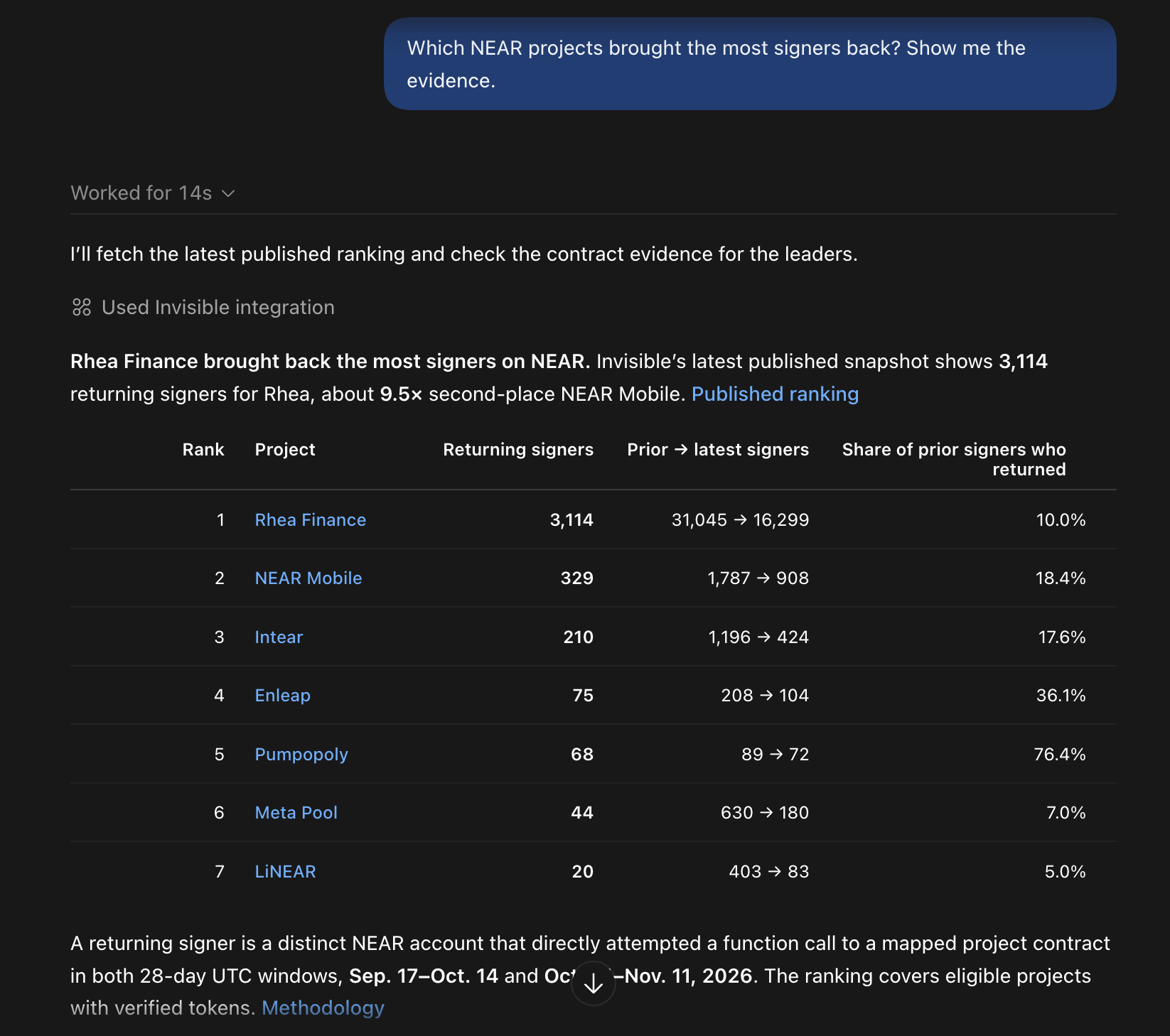
Fetch the agent card, then send an A2A 0.3 JSON-RPC message/send request. The agent accepts returning-signer comparisons, project searches, and verified project IDs. It returns a direct response with research data.
curl -fsS 'https://invisible-gray.vercel.app/.well-known/agent-card.json'curl -fsS 'https://invisible-gray.vercel.app/api/a2a' \
-H 'Content-Type: application/json' \
--data '{"jsonrpc":"2.0","id":1,"method":"message/send","params":{"message":{"kind":"message","role":"user","messageId":"invisible-example-1","parts":[{"kind":"text","text":"Which NEAR projects brought the most signers back? Show me the evidence."}]}}}'const discovery = await fetch("https://invisible-gray.vercel.app/.well-known/agent-card.json");
if (!discovery.ok) throw new Error(discovery.statusText);
const agent = await discovery.json();const response = await fetch(agent.url, {
method: "POST",
headers: {"Content-Type": "application/json"},
body: JSON.stringify({
"jsonrpc": "2.0",
"id": 1,
"method": "message/send",
"params": {
"message": {
"kind": "message",
"role": "user",
"messageId": "invisible-example-1",
"parts": [
{
"kind": "text",
"text": "Which NEAR projects brought the most signers back? Show me the evidence."
}
]
}
}
})
});
if (!response.ok) throw new Error(response.statusText);
console.log(await response.json());Read the agent card to discover the request endpoint and supported skills. Send a JSON-RPC request with a unique message ID and a text prompt, then read the returned research alongside its source links. Read the Agent Card
Install the skill in your agent's project skills directory. It explains when to use each tool, how to cite evidence, and how to distinguish forecasts from observed activity.
mkdir -p .agents/skills/invisible && curl -fsS 'https://invisible-gray.vercel.app/skill/SKILL.md' -o .agents/skills/invisible/SKILL.md$invisible Which NEAR projects brought the most signers back? Show me the evidence.mkdir -p .claude/skills/invisible && curl -fsS 'https://invisible-gray.vercel.app/skill/SKILL.md' -o .claude/skills/invisible/SKILL.md/invisible Which NEAR projects brought the most signers back? Show me the evidence.The skill supplies a research workflow. It tells the agent how to find the project, read the ranking inputs, and cite the evidence. The MCP setup above adds the tools to clients that support them. Download SKILL.md